
Running Lightweight Language Models Locally: A Practical Setup Guide for llama.cpp on Red Hat Linux
Practical Installation, Model Download, and Local Inference with llama.cpp on RHEL


Introduction
This guide provides a step-by-step walkthrough for installing and configuring llama.cpp on RHEL or Fedora systems. llama.cpp is a C++ implementation designed to run large language models (LLMs) locally with relatively low resource requirements. We'll cover building the project from source, downloading a model in GGUF format, and executing a basic embedding inference. This setup is suitable for local experimentation, prototyping, or applications requiring on-premises language model capabilities.
1. Install Required Development Tools and Dependencies
Begin by installing the necessary development tools and libraries:
sudo dnf groupinstall "Development Tools"Enable the CodeReady Builder repository:
sudo subscription-manager repos --enable codeready-builder-for-rhel-9-$(arch)-rpms🔹 If you're on RHEL 8.x, replace 9 with 8 in the above command.
Refresh the package cache:
sudo dnf clean all
sudo dnf makecache
Install essential packages:
sudo dnf install cmake git openblas-devel2. Clone the llama.cpp Repository
Clone the official llama.cpp repository from GitHub:
git clone https://github.com/ggerganov/llama.cpp.git
cd llama.cpp
3. Build the Project
Use CMake to configure and build the project:
cmake -B build
cmake --build build --config Release
This process generates the necessary binaries in the build/ directory.
4. Select and Download a GGUF Model
To perform inference, you'll need a model in the GGUF format compatible with llama.cpp. Follow these steps:
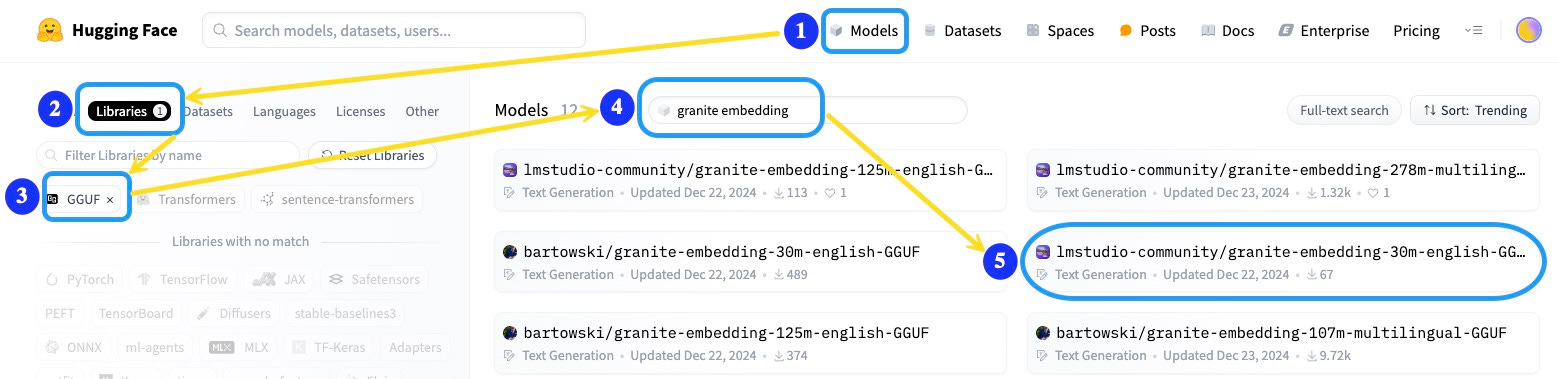
Navigate to the Hugging Face Models page.
Click on the Libraries tab.
Apply the GGUF filter to display compatible models.
Search for a lightweight text embedding model, such as granite embedding.
Select a pre-converted GGUF version, for example: lmstudio-community/granite-embedding-30m-english-GGUF.
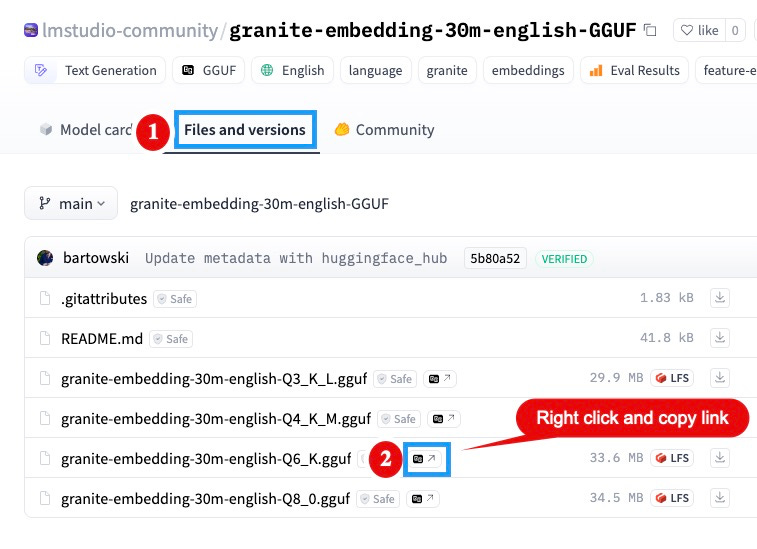
On the model's page, click the Files and versions tab.
Choose the desired quantization level (e.g., 6-bit quantized model for efficiency).
Right-click the download link for the selected model file and copy the link address.
Note: Remove any query parameters like?download=truefrom the copied URL to obtain a direct download link.
Download the model into your llama.cpp directory:
wget https://huggingface.co/lmstudio-community/granite-embedding-30m-english-GGUF/resolve/main/granite-embedding-30m-english-Q6_K.gguf
Verify the download:
ls -lh granite-embedding-30m-english-Q6_K.gguf5. Run Inference: Generate Embeddings
With the model downloaded, you can generate embeddings using the llama-embedding binary:
build/bin/llama-embedding -m granite-embedding-30m-english-Q6_K.gguf -p "What is Python UDF of Db2 LUW?"-m: Specifies the model file.-p: The prompt or text input for embedding.
Example output (truncated for brevity):
embedding 0: -0.030193 0.035757 0.033876 -0.012380 -0.015702 0.044203 -0.026046 -0.029226 0.067675 0.001021 ...Conclusion
By following this guide, you've successfully set up llama.cpp on your RHEL/Fedora system, downloaded a GGUF-formatted model, and performed local embedding inference. This setup is ideal for development and testing scenarios where local execution and resource efficiency are priorities.
Disclaimer
This guide is intended for development and testing purposes. Performance may vary based on hardware specifications and model selection. For production environments or large-scale deployments, additional optimization and resource planning are recommended.